

10 Best Laptops for Digital Nomads: Pros and Cons (2025)
Looking for the best laptops for digital nomads? You’re in the right place.
As a digital nomad, your laptop is a powerful tool and quite literally your lifeline to making income. Whether you’re editing videos from a café in Paris or tackling emails on a beach in Bali, you need a device that’s lightweight, powerful, and reliable enough to handle your unique lifestyle.
After years of working remotely and testing countless setups, I know how overwhelming it can be to find the perfect fit.
That’s why I’ve created this guide to the best laptops for digital nomads. From budget-friendly options to top-tier machines for creatives, I’ll break down the pros and cons of each to help you find your ideal match.
Let’s get started so you can focus less on tech stress and more on your next adventure!
💻 Order the best laptop on the market now!
Top Picks for Digital Nomad Laptops
Best overall: MacBook Pro 14”
Best for video editors: MacBook Pro 16″
Best for the budget-conscious: Lenovo ThinkPad X1 Carbon
Best lightweight laptop: MacBook Air 13″
Best Laptops for Digital Nomads

1. MacBook Pro 14” M4 – Best Overall
The 14-inch MacBook Pro with the standard M4 chip is the best overall laptop for digital nomads. This is the newer version of the computer I use (I have a 13-inch M2 from 2022, for reference).
It’s perfect for everything I need to do, including writing in Google Docs, having multiple tabs open in Google Chrome, editing photos in Lightroom, and running my YouTube channel.
I occasionally edit social media video content in CapCut, and even with the M2 Chip, the laptop is pretty good at handling it, if I don’t have too many other programs open.
Apple designs its computers with creatives in mind, so I highly recommend Apple products to anyone in a creative field.
I personally think the 14-inch is great for digital nomads because it’s smaller and reduces the weight a bit, but if you prefer a larger screen, you could upgrade to the 16-inch, which I’ll cover below.
Size: 12.31″ x 8.71″ x 0.61″ (31.26 x 22.12 x 1.55 cm)
Weight: 3.5 lbs (1.6 kg)
Processor: Apple M4 chip with 10-core CPU and 10-core GPU
RAM/Memory: 16GB unified memory
Battery Life: Up to 18 hours
Storage: 512GB SSD
Pros:
- Great for creatives
- It’s the newer model of the laptop I own
- Fashionable and pretty sleek-looking
- In-store customer support (depending on where you live in the world)
Cons:
- Pricey
- Not the smallest/most lightweight option
💻 Order the MacBook Pro M4 14” now!

2. MacBook Air 13″
The MacBook Air is a great alternative to the MacBook Pro. It’s designed for travel and weighs just 2.7 lbs, making it an excellent choice for digital nomads.
The MacBook Air might also fit your budget better than the MacBook Pro, especially if you just need a laptop for surfing the web and writing.
The one thing that’s not great is if you’re going to decide later on that you want to start creating long-form video content (for a YouTube channel), you will need a more powerful device. But if you already know that’s not going to happen, then the MacBook Air is perfect for you.
Consider upgrading to the 24GB RAM and 512GB of storage, which will give you extra capacity to work with larger files. The 18-hour battery life is also very nice.
All in all, the Macbook Air is an excellent choice for digital nomads since it’s so easy to travel with.
Size: 11.97″ x 8.46″ x 0.44″ (30.41 x 21.5 x 1.13 cm)
Weight: 2.73 lbs (1.24 kg)
Processor: Apple M3 chip with 8-core CPU (4 performance cores and 4 efficiency cores) and up to 10-core GPU
RAM/Memory: 8GB, 16GB, or 24GB unified memory
Battery Life: Up to 18 hours
Storage: 256GB, 512GB, 1TB, or 2TB SSD
Wireless: Wi-Fi 6E and Bluetooth 5.3
Pros:
- Ultra-lightweight and compact for easy travel
- Long battery life (up to 18 hours)
- Affordable compared to the MacBook Pro
- Sharp Liquid Retina display
Cons:
- Limited for video editing or heavy graphics tasks
- Base model storage may feel restrictive
💻 Order the MacBook Air 13″ now!

3. MacBook Pro 16” M4 Pro or Max – Best for video editors
Hands down, the most powerful computer on the market for 2025 is the MacBook Pro M4.
If you’re a video editor who needs to run several heavy programs at once or render video content, I recommend the MacBook Pro M4 with a 16″ screen.
It just came out in October of 2024, so you’re truly getting the latest and greatest.
There are three chip options: 1) the M4, 2) the M4 Pro, and 3) the M4 Max.
I would suggest choosing between the M4 Pro and the M4 Max based on what kind of work you’ll be doing.
The M4 Pro is great for light-to-medium tasks. If your work primarily involves writing, browsing, coding, or light photo/video editing, it’s the best choice. It’s also a bit lighter than the M4 Max.
On the other hand, if you are working on heavy video editing, 3D rendering, and advanced graphics work, go with the M4 Max.
This laptop is almost 5 pounds, which is pretty heavy, but if your work requires it, the speed and larger screen size totally justifies the extra weight.
Size: 14.01″ x 9.77″ x 0.66″ (35.57 x 24.81 x 1.68 cm)
Weight: 4.7 lbs (2.1 kg)
Processor:
– M4 Pro: 14-core CPU and 20-core GPU
– M4 Max: 16-core CPU and 40-core GPU
RAM/Memory:
– M4 Pro: 24GB unified memory
– M4 Max: 32GB unified memor
Battery Life: Up to 22 hours
Storage:
– M4 Pro: 512GB SSD
– M4 Max: 1TB SSD
Pros:
- Larger screen is ideal for video editors
- Wicked fast speed
- Newest laptop on the market
Cons:
- Most expensive option on this list
- Not the lightest
💡 Get the MacBook Pro 16” M4 here!

4. ASUS Zenbook S 14
The new Asus Zenbook S 14 is one of the thinnest and lightest laptops for digital nomads out there. Because it’s so easy to carry in any backpack or side bag, I definitely recommend it if you’re looking to pack light.
I’d say the MacBook Air is the biggest competitor of the ASUS Zenbook. If weight is a critical factor and you’re okay with Windows, the Zenbook beats out the MacBook Air.
Size: 12.22″ x 8.45″ x 0.47″ (31.03 x 21.47 x 1.19 cm)
Weight: 2.65 lbs (1.20 kg)
Processor: Intel® Core™ Ultra 7 Processor 258V (2.2 GHz, 12MB Cache, up to 4.8 GHz, 8 cores, 8 threads)
RAM/Memory: 32GB LPDDR5X
Battery Life: Up to 15 hours on balanced settings
Storage: 1TB M.2 NVMe™ PCIe® 4.0 SSD
Pros
- Lightweight and portable
- High-quality display
- Long battery life – up to 15 hours
- Durable (ceramic)
Cons
- Still a hefty investment
- Graphics – not ideal for video editing
- Not great if you prefer macOS
🌟 Get the Asus Zenbook S 14 today!

5. Lenovo ThinkPad X1 Carbon (Gen 10)
This option is best for digital nomads who are also adventure travelers. The Lenovo ThinkPad X1 Carbon is renowned for its durability. It features a carbon fiber reinforced case and passes durability tests in extreme environments.
I’d say this is the best choice for you if you’re going to be somewhere remote with extreme conditions, like a sandy, windy desert.
Plus, there’s a touch screen. The Lenovo ThinkPad X1 Carbon is a solid choice for a digital nomad laptop.
Size: 12.4″ x 8.8″ x 0.6″ (31.5 x 22.4 x 1.5 cm)
Weight: 2.48 lbs (1.12 kg)
Processor: Up to 13th Generation Intel® Core™ i7-1365U vPro® Processor (E-cores up to 3.90 GHz, P-cores up to 5.20 GHz)
RAM/Memory: Up to 32GB LPDDR5-6000MHz
Battery Life: Up to 12.5 hours
Storage: Up to 1TB SSD M.2 2280 PCIe Gen4 Performance TLC Opal
Pros:
- Lightweight and portable
- High-quality, anti-glare display with a touchscreen
- Durable build
Cons:
- Graphics aren’t great for video editing or gaming
- Battery life isn’t as good as other options
👉 Get the Lenovo ThinkPad X1 Carbon (Gen 10) now!
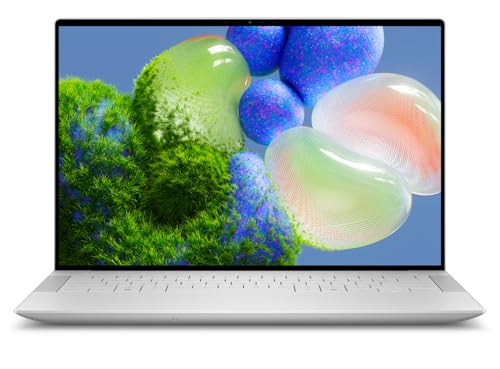
6. Dell XPS 14 9440
The new Dell XPS 14 is designed for performance. The core processor is pretty powerful, allowing you to multitask and keep a lot of tabs open simultaneously (always a nice feature, if you ask me). It’s also great if you prefer Windows over Mac OS.
This laptop is a good option for digital nomads who need a speedy computer. it’s not great for heavy gaming or intensive video rendering, but it can handle everyday tasks like checking email, photo editing, and surfing the web simultaneously.
The screen brightness is one of the best perks of the computer. The display is easy to see even in outdoor settings, so you can probably bring it out to a lounge chair by the pool and live your best digital nomad life!
The backlit keyboard is also a nice touch. This would be my choice if I weren’t already a Macbook Pro fan.
Size: 12.6″ x 8.5″ x 0.26-0.71″ (320 x 216 x 6.7-18.03 mm)
Weight: Starting at 3.7 lbs (1.68 kg)
Processor: Intel® Core™ Ultra 7 155H (24MB Cache, 16 cores, up to 4.8 GHz)
RAM/Memory: Up to 64GB LPDDR5x
Battery Life: Up to 21 hours with FHD+ display
Storage: Up to 4TB M.2 PCIe NVMe SSD
Pros:
- High-quality display
- Robust performance
- Plenty of memory and storage for multitasking
- Great screen brightness
- Nice, long battery life
Cons:
- Heavier
- Premium price point
- Limited port selection
👉 Get the Dell XPS 14 9440 now!

7. LG Gram 17”
First off, the size of the screen on this laptop is truly impressive. A 17-inch screen? That’s the largest on this list.
And at just 2.64 pounds, this digital nomad laptop is one of the lightest options out there.
I’m genuinely impressed by how thin and compact it is, making it an excellent choice for digital nomads seeking a lightweight device with a long battery life.
However, I would suggest getting a case for it, as its slim design may make it more vulnerable to damage or scratches during travel. Additionally, it is somewhat pricey for what it offers.
Size: 14.91″ x 10.19″ x 0.66″ (37.87 x 25.88 x 1.68 cm)
Weight: 2.64 lbs (1.2 kg)
Processor: Intel® 13th Gen Core™ i7-1360P
RAM/Memory: 16GB LPDDR5
Battery Life: Up to 20 hours
Storage: 1TB NVMe Gen 4 M.2 SSD
Pros:
- Lightweight and portable
- Big, high-quality display
- Long battery life (up to 20 hours)
- Generous 1TB storage
Cons:
- Pricey for its category
- Integrated graphics limit gaming and heavy editing
- Limited port options
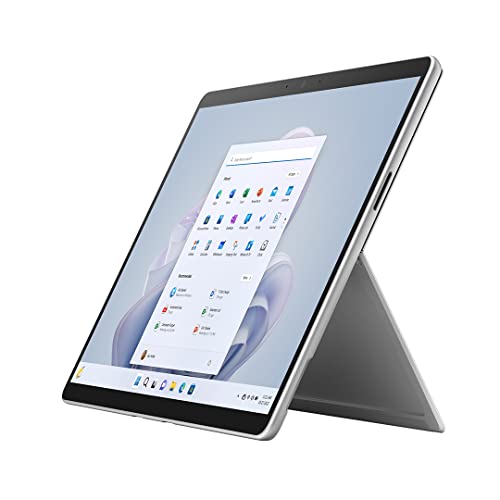
8. Microsoft Surface Pro 9 – Best 2-in-1 Option
The Microsoft Surface Pro 9 is a digital nomad’s best friend. Its portability and affordability make it a fantastic choice.
With an amazing battery life of up to 15.5 hours, it’s great for on-the-go use.
I personally think the Surface Pro 9 is a fine option over newer models like the Surface Pro 11, especially if you’re on a budget.
The newer version is just a bit too pricey, and I don’t think the upgrades make that much of a difference.
It’s also super cool that the Surface Pro has 5G connectivity which means you don’t have to struggle to find Wi-Fi — but you do need a data plan. While traveling internationally, you can get an eSIM for the Surface Pro, just keep in mind the additional cost.
Just a heads-up: the Surface Pro is technically a tablet, so you’ll need to grab the case with the keyboard separately. But if that doesn’t bother you and you enjoy using a touchscreen, the Microsoft Surface Pro 9 is definitely a great pick for you!
Size: 11.3″ x 8.2″ x 0.37″ (287 x 209 x 9.3 mm)
Weight: 1.94 lbs (879 g)
Processor Options:
– 12th Gen Intel® Core™ i5-1235U
– 12th Gen Intel® Core™ i7-1255U
– Microsoft SQ® 3 with Neural Processing Unit (NPU)
RAM/Memory: 8GB, 16GB, or 32GB LPDDR5
Battery Life:
– Intel models: Up to 15.5 hours
– SQ® 3 model: Up to 19 hours
Storage: Removable SSD options of 128GB, 256GB, 512GB, or 1TB
Pros:
- Lightweight and portable
- Budget-friendly
- Wi-Fi 6E and optional 5G for seamless connectivity
- Long battery life (up to 19 hours with SQ® 3)
- Removable SSD for easy upgrades
Cons:
- Premium price for higher configurations
- Limited ports (mostly USB-C)
- SQ® 3 model may have compatibility issues with certain apps
💻 Get the Microsoft Surface Pro 9 now!

9. Lenovo Yoga 7 14 Gen 9 (2-in-1)
Like the Surface Pro, the Lenovo Yoga 7 14 Gen 9 is a versatile 2-in-1 laptop that offers impressive performance and flexibility. Its 14-inch display provides clear visuals, and the 360-degree hinge allows you to switch between laptop and tablet modes, adapting to wherever you’re setting up to work.
It’s cool that the 2-in-1 design lets you flip it into tablet mode for sketching, reading, or taking notes, making it ideal for work and play.
Powered by the latest processors, it handles multitasking efficiently, whether you’re editing photos, streaming content, or managing multiple applications.
And battery life is pretty good, supporting long work sessions without frequent recharging. With a starting price under $1,000, it delivers strong value for budget-conscious nomads.
While it’s not built for intense gaming or 3D rendering, it’s an excellent choice for most remote work setups and creative projects.
Size: 12.5″ x 8.5″ x 0.6″ (31.75 x 21.59 x 1.52 cm)
Weight: 3.2 lbs (1.45 kg)
Processor Options:
– Intel Core i5-1335U
-Intel Core i7-1255U
RAM/Memory: Up to 16GB LPDDR5
Battery Life: Up to 15 hours
Storage: 512GB or 1TB PCIe NVMe SSD
Pros:
- Lightweight and portable 2-in-1 design
- Sharp 14-inch touchscreen display with vibrant colors
- Solid performance for multitasking with Intel processors
- Long battery life
Cons:
- Not ideal for gaming or heavy editing
- Limited port options
👉 Get the Lenovo Yoga 7 14 Gen 9 now!

10. Samsung Galaxy Book 4 Pro
With a battery life that keeps up with long workdays, the Samsung Galaxy Book 4 Pro is a solid option for long travel days.
It also has plenty of ports (yes, even HDMI and USB-A) so you won’t need to carry around extra dongles, which can be handy if you’re packing light.
The Intel Core Ultra processor is powerful enough for multitasking, but I personally think if you’re editing video or gaming, you’ll need additional GPU.
It’s also a bit of a splurge, and the base model only has 512GB of storage, so you’re probably going to need an external drive. Although, I usually recommend using an external hard drive, no matter what.
Overall, this is a good option if you want a sleek, powerful laptop that’s also travel-friendly. Although it isn’t my top choice, it’s still worth considering for its solid battery life.
Size: 12.3″ x 8.8″ x 0.44″ (312.3 x 223.8 x 11.3 mm)
Weight: 2.58 lbs (1.17 kg)
Processor Options:
– Intel Core i5-1340P
– Intel Core i7-1360P
RAM/Memory: 8GB or 16GB LPDDR5
Battery Life: Up to 18 hours
Storage: 256GB, 512GB, or 1TB NVMe SSD
Pros:
- Excellent battery life for long workdays
- Plenty of ports, including HDMI and USB-A, reducing the need for dongles
- Powerful Intel Core Ultra processor for multitasking
- Sleek and lightweight design, ideal for travel
Cons:
- Base model only offers 512GB storage, which may require an external drive
- Limited GPU power, not ideal for video editing or gaming
- Higher price point compared to similar models
💻 Buy the Samsung Galaxy Book 4 Pro now!
Things to Look for in a Laptop for Traveling
Portability and Weight
As you might expect, the weight of your laptop is going to matter quite a lot while you’re digital nomading. When your computer weighs more, that’s going to mean a heavier load on your shoulders when you carry your laptop in your backpack. If you’re considering a size with a screen over 13”, be sure to check it fits in your backpack before you purchase.
Battery Life
Having a long-lasting battery is a huge perk. It goes without saying: the longer you can be cord-free and unplugged from the wall, the longer you can work while on an airplane, train, or anywhere else, for that matter.
You’ll want to look for a battery that lasts at least 10 hours. Battery life is a big deal, unless you’re not planning on working at coworking spaces, cafes, or in transit much. It’s always an inconvenience to have to search for a plug when you’re in the middle of a focused work session, am I right?!
Processing Power and Performance
This is often the part of laptop buying that confuses most of us. I’ll break it down for you with the help of an analogy.
CPU
Think of a computer’s CPU like a chef cooking a meal. The chef (CPU) is responsible for performing the actual cooking (processing tasks). The chef decides how to combine ingredients, follows the recipe (instructions), and prepares the meal (output).
A skilled chef (a fast CPU) can cook multiple meals faster or handle complex recipes efficiently.
RAM
You’ll want at least 8GB of RAM for standard use and 16GB for more powerful tasks.
Think of RAM as the countertop where ingredients are placed for easy access while cooking. The counter provides quick access to everything the chef needs at the moment.
If the counter is too small (limited RAM), the chef has to run back and forth to the pantry (storage), which slows things down.
The key thing to remember? A larger counter (more RAM) allows the chef to work more efficiently by keeping more ingredients within reach. However, a skilled chef (fast CPU) will still be slowed down if the counter is cluttered or too small.
Storage
In my opinion, internal storage is the least important factor to consider when buying a laptop for travel, and it’s better to prioritize RAM and CPU. I try to keep as few files on my laptop as possible, and I store more on an external hard drive.
However, I’d say you need at least 256GB of internal storage for a laptop to be worth your while. For example, my MacBook Pro has 500 GB of storage, which works great for me.
But, if you don’t have an external hard drive or a cloud storage service like Dropbox, then your storage becomes way more important. This is something to keep in mind if you’re traveling to a place with slow or very limited internet connectivity.
Durability
If you’re prone to dropping your laptop or even if you’re just traveling long distances with it, durability is a factor to consider. It’s a simple fact that going places with your computer is going to take a toll. You might want to get a case for it to protect the outer shell or opt for a laptop like the Lenovo ThinkPad X1 Carbon, which is made of durable materials. A water-resistant keyboard is also a major bonus to protect against accidental spills.
Ports
The last thing you want while traveling is trying to transfer video files and then realizing your sleek laptop has fewer ports than a toddler’s toy.
USB-C is the newer, smaller, and more versatile port that supports faster data transfer and charging. USB-A, on the other hand, is the older, rectangular port that many devices still use for accessories like external drives, keyboards, and mice. While USB-C is becoming more common, USB-A is still widely used, so having both types of ports ensures compatibility with a variety of devices.
For photographers or content creators, an SD card reader is essential for quickly transferring files from a DSLR camera to your laptop. An HDMI port is useful for connecting your laptop to external monitors or TVs, whether for work or entertainment. If your laptop doesn’t include these ports, you may need an HDMI adapter or hub.
FAQS About Digital Nomad Laptops
Which laptop is the best for digital nomads?
The MacBook Pro is widely regarded as the best laptop for digital nomads in 2025. It combines high performance with excellent battery life, making it perfect for demanding tasks like video editing, graphic design, and multitasking. The M4 chip provides incredible speed and energy efficiency, and its lightweight, durable design makes it easy to travel with.
What are the most important features to look for in a laptop as a digital nomad?
Portability, long battery life, reliable performance, and strong connectivity (like Wi-Fi 6 and multiple ports) are essential. Consider durability and storage space if you’re constantly on the move.
How much should I expect to spend on a laptop for remote work in 2025?
A good laptop for digital nomads typically costs between $800 and $1,500, depending on your needs. High-performance models with better specs for creative tasks may be more expensive.
Are 2-in-1 laptops a good choice for digital nomads?
Yes, 2-in-1 laptops can be a great option for digital nomads, especially those who need versatility. They function as both a laptop and a tablet, making them ideal for multitasking. You can take notes, sketch, or stream in tablet mode and then switch to laptop mode for work tasks like writing, editing, or coding. Models like the Microsoft Surface Pro or Lenovo Yoga series are popular among travelers for their flexibility and portability.
Which operating system is best for digital nomads: Windows, macOS, or Chrome OS?
Windows offers flexibility and is great for compatibility with various software.
macOS is preferred for creative professionals using apps like Final Cut Pro or Photoshop.
Chrome OS is lightweight and ideal for web-based tasks but has limited offline functionality.
How much battery life should I look for?
Aim for a laptop with at least 10 hours of battery life. A longer battery is ideal for long flights, working in cafes, or other situations without easy access to power outlets.
Is it better to travel with a tablet or a laptop?
It’s really your call! I travel with both so I can use my iPad as a second display. I could never travel with only my tablet. A tablet is great for tasks like reading, streaming, or light typing with an attached keyboard, making it ideal if you aren’t working a lot while traveling. A laptop is better for productivity-heavy tasks like video editing, coding, or multitasking with multiple apps.
Should I prioritize a lightweight laptop or a larger screen?
If you’re constantly on the go, prioritize lightweight and portable designs (13–14 inches). For tasks requiring more screen ‘real estate’, like video editing, a 15–16-inch laptop might be better, despite the extra weight.
How do I keep my laptop safe while traveling?
Get a sturdy travel case or sleeve, and always get travel insurance that covers theft or damage. You can also get a privacy screen filter so other people can’t read your screen in public places.
Is an external keyboard or mouse necessary for digital nomads?
It’s totally not necessary, but I think it’s great to have an external keyboard and mouse for ergonomics, especially if you’re working for extended periods. Many digital nomads carry compact, Bluetooth keyboards and mice to reduce strain.
Powering Down: Best Laptops for Digital Nomads
If you’re looking for a versatile, high-performing, and reliable laptop to keep up with the demands of a digital nomad lifestyle, the MacBook Pro 14” is the ultimate choice. It checks all the boxes with power, portability, and premium design.
For a more budget-friendly option that’s still a top performer, go with the MacBook Air or the Lenovo ThinkPad X1 Carbon. The Lenovo may not have the sleek design of a MacBook, but it makes up for it with practicality and a lower price tag.
👉 Ready to make your nomad life easier? Order your MacBook Pro 14″ now!
Read More About Digital Nomad Life
- 7 Simple Digital Nomad Tips That Will Change Everything for You
- TrustedHousesitters Review: My Experience as a Pet Parent Who Loves to Travel
- Sony a6700 HONEST Review: Is It a Good Travel Camera?
- I Tested Airalo vs. GigSky: Which eSIM is Better? A Full Review
- I Practiced Spanish with Babbel Every Day for Two Weeks — An Honest Review
Planning a trip right now? Here are a few top resources I use on every trip:
🏨 Booking.com for great deals on hotels.
🎟️ GetYourGuide for incredible tours around the world.
🌍 Faye for travel insurance with great customer support.
📞 eSIM for staying connected in the air, on a cruise ship, or exploring on foot.
🗣️ Babbel for brushing up on my language skills.
